
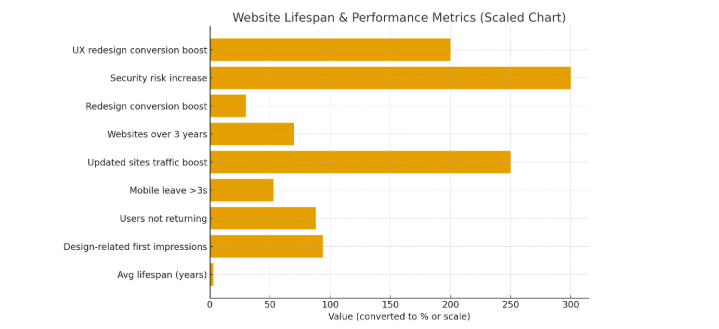
Websites are essential for businesses, but they don’t last forever. Many organizations treat their website as a one-time project, only realizing problems when traffic drops, conversions getting slow, or features break. The average website lifespan is about two to three years, with some sites becoming outdated even sooner if not properly maintained. Understanding this lifespan helps businesses plan updates, prevent performance issues, and stay competitive online. In this article, we will discuss the key reasons websites age and what you can do to extend their effectiveness. We’ll also share 7 actionable strategies to extend your website’s longevity, ensuring it stays efficient, reliable, and relevant.
Reported average website lifespan by renowned source
- Forbes puts the average at about 2 years 7 months; Orbit Media’s survey of well-maintained agency sites found 6.3 years.
- Nielsen Norman Group (homepage change proxy): 3.0 years.
- Typical small/medium business average range: 2–3 years (industry consensus).
Bottom line: industry averages cluster around 2–3 years for many organizations, but with concerted maintenance and modern practices, some sites sustain business outcomes for 3–6+ years without a full rebuild.
Simple inline bar diagram (each ▇ = 1 year)
| Company | Years | Bar |
|---|---|---|
| Orbit Media | 6 | (6) ▇▇▇▇▇▇ |
| Forbes summary | 2.5 | (2.5) ▇▇ |
| Nielsen Norman Group | 3 | (3) ▇▇▇ |
How researchers define “website lifespan” (and what the numbers say)
Researchers and agencies measure website lifespan differently:
- Redesign interval: the time between major visual/structural redesigns (common industry metric).
- Functional obsolescence: when key features or integrations no longer work without significant engineering.
- Performance/SEO decay: when page speed, Core Web Vitals, or crawlability decline enough to reduce organic traffic.
- Compliance/accessibility drift: when the site no longer meets WCAG or privacy rules.
Why sites age (root causes you can fix)
- Technology churn. Browsers, JavaScript frameworks, and hosting stacks evolve. Without updates, components break or slow down.
- Performance debt. Accumulated scripts, oversized images, and render-blocking code push Core Web Vitals into bad ranges, Google increasingly ties user experience and ranking signals to these metrics.
- Content rot. Old product pages, outdated policies, and stale blog posts lose relevance and search visibility.
- Integration and security drift. APIs change, third-party libraries become vulnerable, and missing patches create functional and compliance failures. OWASP recommends automated dependency and vulnerability scanning as a core defense.
- Accessibility & compliance gaps. Accessibility standards (WCAG) and privacy laws shift; noncompliance creates legal and reputational risk.
- Modern websites age faster not because they are poorly built, but because the digital environment surrounding them evolves every single month. Search engines introduce new ranking systems, browsers deprecate old technologies, privacy regulations tighten, and user expectations rise. A site that once felt modern can quickly appear outdated when new design conventions emerge or competitors invest heavily in UX and performance.
- Another overlooked factor is third-party dependency risk: analytics scripts, marketing tools, and plugins frequently update, and even one outdated integration can cause slowdowns or security weaknesses across the entire site.
The business cost of a neglected website
- Additionally, poor mobile optimization can drive users away, reducing brand loyalty and limiting market reach.
- Reduced conversions because slow or confusing UX ruins buyer intent.
- Higher emergency costs for rushed redesigns or security incident responses.
- Brand damage from a site that appears outdated or broken.
These are not theoretical: search engines explicitly recommend good Core Web Vitals for improved user experience and long-term search performance, and regulators increasingly enforce accessibility and privacy rules.
Let’s discuss 7 proven ways that extend website life.
7 proven ways to extend your website’s lifespan
| Strategy | What it fixes | Why it extends lifespan |
|---|---|---|
| Continuous improvement roadmap | Outdated UX, content rot | Prevents large disruptive rebuilds; keeps site aligned to goals |
| Component-based design | Slow/expensive visual updates | Enables targeted changes and consistent UI updates |
| Performance-first engineering | Slow LCP, high CLS | Improves rankings and user experience; delays obsolescence |
| Content health program | Stale pages, thin content | Maintains authority and organic traffic |
| Automated dependency & security scans | Vulnerable libraries, broken integrations | Prevents emergency rebuilds after breaches |
| Accessibility & compliance program | Legal/UX risks | Lowers liability and improves usability across audiences |
| Progressive enhancement | Breakage on older clients | Ensures resilience and broader compatibility |
1. Treat the website as a product, not a project
Adopt a continuous improvement model: small, measurable monthly updates, quarterly UX/SEO sprints, and annual technical audits. This product mindset avoids disruptive, expensive rewrites and keeps features and content aligned with business needs.
2. Use component-based design and modular front-end architecture
Design systems and reusable components (buttons, forms, hero blocks) let you refresh parts of a site without rebuilding the whole. Teams can update visuals and behavior faster while preserving brand consistency.
3. Make performance a business KPI (Core Web Vitals)
Track and prioritize LCP (Largest Contentful Paint), INP/FID (interaction latency), and CLS (layout stability). Use Lighthouse, PageSpeed Insights, and real-user monitoring to find the biggest wins. Google documents both the metrics and the business case for improving them.
4. Implement a content health program
Carry out regular content audits: prune or consolidate thin pages, refresh high-value posts, and maintain an editorial calendar. Fresh, authoritative content retains search visibility and user trust.
5. Automate security and dependency management
This step not only protects against hacks but also ensures your website stays compatible with new plugins and integrations, reducing future technical debt. Integrate tools like OWASP Dependency-Check or SCA (software composition analysis) into CI pipelines to detect vulnerable libraries early. Automate dependency updates where safe; schedule human review for major changes. This prevents sudden failures and costly emergency patches.
6. Ensure accessibility and compliance are non-negotiable
Follow WCAG principles, test with automated tools (axe, WAVE) and manual checks (keyboard navigation, screen readers). Accessibility improvements often increase overall usability and reduce legal risk.
7. Embrace progressive enhancement and graceful degradation
Build so the core experience works on low bandwidth and older browsers, while more advanced features are added conditionally. This reduces breakage and accommodates the widest possible audience.
Quarterly audit checklist (practical)
- Run Lighthouse / PageSpeed Insights: record LCP, INP/FID, CLS.
- Run accessibility scans (axe, WAVE) and fix top 10 issues.
- Inventory third-party scripts; remove or lazy-load nonessential ones.
- Refresh 10% of site content (products, cornerstone posts).
- Run dependency checks (OWASP tools, Dependabot) and patch urgent vulnerabilities.
- Test critical user flows on multiple devices and browsers.
Final thoughts
The question “How long does a website last?” is less useful than “How long will my website keep delivering business outcomes?” With a product mindset, continuous updates, modular design, performance-first engineering, and automated security, you shift the answer from “replace every few years” to “evolve continuously.” That change in approach converts costly surprises into predictable, manageable investments and dramatically extends the lifespan of your online presence. A site that feels modern and functional today may become outdated in less than two years as new technologies, security requirements, and UX trends emerge. In short, longevity in the digital world requires continuous improvement and a commitment to staying ahead of industry trends. And if you’re planning a redesign, learning how to pick the web agency will help you choose a partner that builds websites with long-term sustainability in mind.
FAQs
Q1: How long can a well-maintained website realistically last?
A well-maintained site that follows continuous improvement, component design, and automated security practices can comfortably serve for 3–6+ years between full redesigns; some enterprise clients stretch even longer by investing steadily.
Q2: If my site is 4 years old, should I rebuild?
Not automatically. Audit performance, security, accessibility, and content health first. Many sites need incremental fixes rather than a full rebuild. If core architecture or CMS limits future growth, plan a phased rebuild. For cost planning, our breakdown of how much a website costs gives realistic pricing expectations.
Q3: What metric shows a site is “aging”?
Key signals: falling organic sessions, worsening Core Web Vitals, rising bounce rate, increasing form errors, or frequent integration failures.
Q4: Does accessibility investment really extend lifespan?
Yes. Accessibility improvements increase usability for everyone and reduce legal/compliance risk as regulations tighten. The W3C’s WCAG guidelines are the authoritative standard.
Q5: What’s the cheapest way to delay a rebuild?
Adopt a content health program, remove unused scripts, improve images and caching, and focus on a few performance wins. Small changes can significantly improve UX and rankings.
Q6: Which toolset should I start with?
Start with Lighthouse/PageSpeed Insights (performance), axe/WAVE (accessibility), and an SCA tool or Dependabot for dependencies (security). These give a high-signal view of urgent issues.