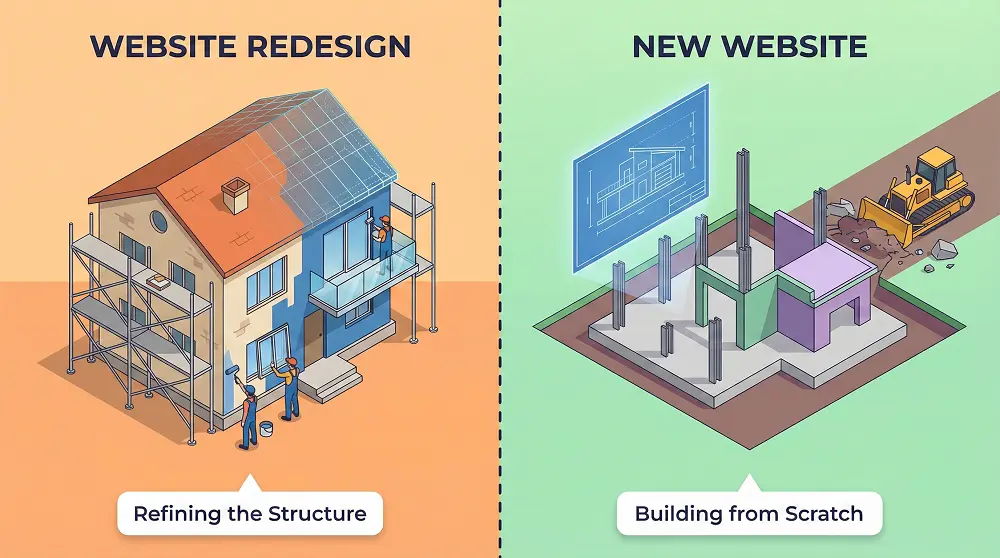


In this guide, we’ll walk you through eight steps website redesign checklist that can make your New Jersey website stand out. You’ll find practical checkpoints, tools, templates, and explanations that will help you plan, implement, launch, and improve your new site.
Website Redesign Checklist
Before starting a website redesign, you should follow a structured checklist to avoid traffic loss, SEO issues, and poor user experience. The table below outlines the key stages and tasks you need to review and complete during a redesign project.
Use this checklist as a planning and execution guide. Each phase plays a critical role in ensuring your redesigned website is fast, user-friendly, SEO-optimized, and aligned with your business goals.
| Number | Checklist Phase | ✔️ Status / Notes |
|---|---|---|
| 1 | Pre-Redesign Strategy | ☐ |
| 2 | Technical & SEO Preparation | ☐ |
| 3 | UX & Design Preparation | ☐ |
| 4 | Content Strategy | ☐ |
| 5 | Development & Launch Prep | ☐ |
| 6 | Post-Launch Optimization | ☐ |
| 7 | Tools & Resources | ☐ |
| 8 | Bonus: NJ-Focused Tips | ☐ |
What You Should Do Before Moving Forward
- Review each checklist item and confirm it aligns with your business objectives
- Identify gaps in SEO, content, design, or technical setup
- Assign responsibilities to your internal team or web agency
- Document everything before development begins to avoid costly mistakes later
A successful website redesign means removing the elements from website that hinder growth. It’s not just about visuals—it’s about strategy, performance, and long-term success, especially for businesses competing in local New Jersey markets.
Next Step: Now that you have a high-level checklist in place, let’s discuss each section one by one in detail and explain what needs to be done, why it matters, and how New Jersey businesses can implement it correctly.
1. Pre-Redesign Strategy
Before touching a single pixel, line of code, or selecting a template, a website redesign needs clarity and direction. According to Harvard Business Review and HubSpot, projects without defined objectives often fail because teams don’t agree on what “success” looks like.
Set Clear Goals
Every redesign should support measurable outcomes. For New Jersey businesses, typical objectives include:
- Increase organic leads
- Reduce bounce rates
- Improve local search visibility (e.g., “plumber in New Jersey”)
These goals act as KPIs, guiding every design, content, and technical decision.
Audit Your Current Site
A full audit protects your existing SEO performance and highlights opportunities. Focus on:
- Technical performance (speed, mobile usability)
- Content relevance and quality
- Navigation and user experience
- SEO metrics (rankings, indexed pages)
| Audit Area | Recommended Tool |
|---|---|
| SEO & indexing | Google Search Console |
| Speed & performance | Google PageSpeed Insights |
| Content & technical review | Screaming Frog |
| User behavior & heatmaps | Hotjar |
Skipping this step is a common reason redesigns fail.
Benchmark Competitors
Analyzing local competitors helps identify what works in your market. Look at:
- Navigation and site structure
- Messaging and calls-to-action
- Local SEO signals like NAP consistency
- Content depth and quality
Competitive benchmarking is about learning patterns and gaps, not copying.
Quick Pre-Redesign Checklist
- Business goals and KPIs defined
- Current site audited for SEO, UX, and performance
- NJ competitors analyzed for structure and messaging
With strategy set, you can move confidently into Technical & SEO Preparation, knowing your redesign is built on data and clear goals.
2. Technical & SEO Preparation
A strong website redesign is built on technical readiness. Without addressing SEO and performance first, even the most beautiful site can lose traffic or frustrate users. Planning technical and SEO aspects before and during a redesign is critical to maintaining search visibility and delivering a fast, user-friendly experience.
Plan Your SEO Checklist
A redesign without SEO planning can result in significant ranking drops. Prepare a checklist covering both pre- and post-redesign tasks:
Pre-Redesign:
- Crawl errors
- Broken links
- XML sitemap verification
- Robots.txt setup
- URL structure audit
Post-Redesign:
- 301 redirects for old URLs
- Metadata optimization (titles, descriptions)
- Structured data/schema implementation
- Mobile-first indexing check
Optimize Core Web Vitals
Google uses Core Web Vitals to measure a site’s performance, which directly impacts rankings and user experience. Key metrics include:
| Metric | What it Measures | Recommended Tool |
|---|---|---|
| LCP (Largest Contentful Paint) | Time to load main content | PageSpeed Insights |
| CLS (Cumulative Layout Shift) | Visual stability | GTmetrix |
| FID (First Input Delay) | Interactivity speed | Lighthouse |
Optimizing these metrics ensures fast loading, smooth interaction, and lower bounce rates, which are essential for SEO and conversions.
Mobile-First & Responsive Design
With mobile traffic surpassing desktop globally, Google now prioritizes mobile versions for indexing and ranking. A responsive site ensures users on smartphones and tablets have a seamless experience.
Checklist for Mobile-Ready Design:
- Navigation is touch-friendly
- Fonts, buttons, and forms scale properly
- Media loads quickly on mobile networks
Ignoring mobile optimization can harm rankings and user satisfaction.
Quick Technical & SEO Checklist
- Pre-redesign SEO audit completed
- Core Web Vitals optimized
- Site fully responsive and mobile-friendly
- Post-redesign SEO tasks planned
With technical foundations in place, the site is ready for UX & Design Preparation, where visuals and usability meet strategy.
3. UX & Design Checklist
A website’s design is more than just aesthetics; it’s about usability, accessibility, and guiding users toward your goals. As noted by DreamHost, a well-planned UX ensures visitors can navigate your site effortlessly, find what they need, and take action.
Plan UX Wireframes
Wireframes act as the skeleton of your site, laying out content, calls-to-action (CTAs), and navigation before adding design elements. Starting with both desktop and mobile wireframes ensures layouts are optimized across devices.
| UX Element | What to Check |
|---|---|
| Header & Navigation | Easy to locate, simple structure |
| CTAs | Clear, prominent, action-oriented |
| Search | Works effectively for content-heavy sites |
| Breadcrumbs | Enhance navigation & support SEO |
| Trust Signals | Reviews, awards, certifications |
Wireframing first lets designers and developers focus on functionality and flow before styling.
Accessibility Matters (WCAG)
Web accessibility ensures all users, including those with disabilities, can access your content. Beyond inclusivity, it also improves SEO and reduces legal risk. Aim to comply with WCAG 2.1 standards, recommended by experts in academic research.
Accessibility Best Practices:
- Alt text for all images
- Keyboard-friendly navigation
- Proper heading hierarchy (H1–H6)
- High-contrast text for readability
Accessibility isn’t optional; it’s a critical part of modern UX design and enhances your site’s usability for everyone.
Quick UX & Design Checklist
- Wireframes completed for desktop & mobile
- Navigation and CTAs optimized for usability
- Accessibility standards (WCAG 2.1) met
- Trust signals and search functionality implemented
With UX and design foundations ready, your site is prepared for Content Strategy, where messaging, copy, and SEO-aligned content come together.
4. Content Strategy
Content isn’t just words on a page; it’s what converts visitors into customers. A well-planned content strategy ensures your redesigned site communicates clearly, ranks well in search, and serves both user and business goals. As noted by Exposure.com, mapping your content before a redesign saves time and avoids unnecessary duplication.
Content Inventory & Mapping
Before redesigning, take a full inventory of all existing content pages, blogs, and resources. Categorize each piece to decide its future:
| Action | Description |
|---|---|
| Keep | High-performing content with strong traffic & engagement |
| Rewrite | Outdated or underperforming pages |
| Remove | Duplicate, irrelevant, or thin content |
| Add | New content to fill gaps in your strategy |
This “content map” ensures your site structure is clean, purposeful, and user-focused.
Keyword & Topic Strategy
Keyword research is essential to target the right audience, especially for local New Jersey businesses. Focus on:
- Local search terms (e.g., “roofing contractor in Hoboken”)
- Service-specific keywords
- Long-tail phrases for blog content
Match keywords to user intent, informational vs. commercial to guide visitors through the conversion funnel effectively.
Internal Linking Structure
Internal links help search engines understand site hierarchy and guide users to related pages. A smart linking strategy can also pass authority from high-traffic pages to new or strategic pages, boosting rankings and engagement.
Quick Content Strategy Checklist
- Complete content inventory & mapping
- Identify pages to keep, rewrite, remove, or add
- Conduct keyword research targeting local and service-specific terms
- Plan internal linking for SEO and UX
With a solid content foundation, your redesign moves confidently into Development & Launch Prep, combining design, content, and technical readiness into a seamless site.
5. Development & Launch Prep
A successful redesign isn’t complete until development and launch are carefully planned. Thorough testing ensures your site works flawlessly across devices, browsers, and user scenarios, preventing costly post-launch issues.
Test on a Staging Site
Never work directly on your live website. A staging environment allows you to:
- Test the new design
- Evaluate UX flows and navigation
- Run SEO checks
- Fix bugs before going live
This ensures the live site remains uninterrupted while you verify functionality.
Cross-Browser & Device Testing
Your site should perform consistently on all major browsers: Chrome, Firefox, Safari, and Edge. Cross-browser testing ensures users don’t encounter layout issues, broken elements, or performance problems, which could hurt engagement and SEO.
Pre-Launch Checklist
Before publishing your redesigned site, confirm the following:
- Backup the current site
- Set up necessary 301 redirects
- Run full QA (links, forms, page speed, mobile responsiveness)
- Submit updated sitemap to Google Search Console
Using this checklist reduces post-launch errors and ensures your site is fully optimized for users and search engines.
6. Post-Launch Optimization
Launching your redesigned site isn’t the finish line; it’s just the beginning. Best practices, continuous monitoring, and optimization are key to maintaining traffic, improving conversions, and ensuring your redesign delivers measurable results.
Monitor Analytics & KPIs
Track performance using Google Analytics and Google Search Console. Focus on metrics that show real user engagement and business impact:
- Traffic trends and top-performing pages
- Conversion rates and form submissions
- Bounce rates and exit pages
- Page performance and load times
A/B Testing for Continuous Improvement
A/B testing allows you to experiment with headlines, CTAs, layouts, and other elements. By measuring user interactions, you can make data-driven adjustments to maximize conversions and improve user experience.
Tip: Test one element at a time and run experiments long enough to gather statistically significant results.
Quick Post-Launch Checklist
- Track traffic, engagement, and conversions
- Compare pre- and post-launch KPIs
- Run A/B tests to optimize UX and conversions
- Adjust content, CTAs, or layout based on data
With post-launch monitoring in place, your redesigned website continues to grow, adapt, and perform long after it goes live.
7. Tools & Resources
Having the right tools makes a website redesign efficient, data-driven, and measurable. From SEO audits to UX testing, leveraging proven tools ensures you stay on track and make informed decisions.
SEO & Performance Tools
Monitor and optimize technical and search performance with:
| Purpose | Recommended Tool |
|---|---|
| SEO audit & indexing | Google Search Console, Moz, SEMrush |
| Page speed & Core Web Vitals | Google PageSpeed Insights, GTmetrix, Lighthouse |
| Keyword research | Ahrefs, SEMrush, Ubersuggest |
UX & Design Tools
Improve usability and visualize layouts using:
- Wireframing & Prototyping: Figma, Adobe XD, Sketch
- User Behavior & Heatmaps: Hotjar, Crazy Egg
- Accessibility Testing: WAVE, axe Accessibility Scanner
Project Management & Collaboration
Keep your team organized and on schedule with:
- Trello, Asana, and Monday.com for task management
- Slack or Microsoft Teams for communication
- Google Drive or Notion for documentation
Tip: Integrating these tools into your workflow reduces errors, enhances collaboration, and keeps redesign tasks aligned with your KPIs.
Quick Tools & Resources Checklist
- SEO and performance monitoring tools set up
- UX and design tools for wireframing and testing ready
- Project management and documentation workflow established
With the right tools in place, your redesign becomes smooth, measurable, and professional, making every stage easier to manage.
8. Bonus: NJ-Focused Tips
For New Jersey businesses, local relevance can make or break your website’s performance. Incorporating location-specific SEO, content, and trust signals ensures your redesign connects with the right audience.
Optimize for Local Search
Include city and neighborhood keywords in your content, metadata, and headings. Examples:
- “Roofing contractor in Hoboken”
- “NJ-based IT consulting firm.”
Verify your Google Business Profile, include NAP (Name, Address, Phone) consistency, and encourage local reviews. According to Moz, local signals are crucial for ranking in Google’s local pack.
Highlight Trust & Community
New Jersey users respond well to local credibility and community presence. Consider:
- Showcasing partnerships with local organizations
- Featuring customer testimonials from nearby towns
- Including awards, certifications, or recognitions relevant to NJ
These elements increase trust and engagement, especially for service-based businesses competing in crowded local markets.
Local Content & Events
Create blog posts or resources around NJ-specific topics or events, such as:
- Local industry trends
- Community events or sponsorships
- Guides for local services or regulations
This not only improves SEO but positions your business as a knowledgeable local authority.
Quick NJ-Focused Checklist
- Include location-specific keywords in content and metadata
- Verify NAP and encourage local reviews
- Showcase local credibility through testimonials, awards, or partnerships
- Produce NJ-relevant blog posts or guides
By adding these NJ-focused touches, your redesigned website resonates with local audiences, improves search visibility, and builds trust in your community.
Final Thoughts: Take Your Website to the Next Level
A successful website redesign is more than just updating visuals; it’s about strategy, performance, user experience, content, and local relevance. By following this checklist, New Jersey businesses can ensure their new website not only looks professional but also drives traffic, converts visitors, and supports long-term growth.
Ready to make your website work harder for your business? BuiltForService specializes in helping local businesses plan, design, and launch websites that are fast, user-friendly, and optimized for search. Start your redesign journey today and turn your site into a powerful growth engine.
Contact BuiltForService.com to Get Started